
You approve it. We carry it out.
It starts when
Access work starts with a moment in your week.
A person joins, moves, or leaves. A system or an admin role is needed. A review comes due. Each one enters the Portal as a request, and our specialists take it from there.
A hire joins
A start date is set. The access the role needs is requested and approved ahead of day one.
Someone changes teams
A new role brings new access. The change runs as its own request for that person.
Someone leaves
A last day is set. The leaver steps start on that day and run to a close.
Someone needs a new system or admin rights
A tool, a shared folder, a project that needs elevated access. The request goes to the approvers you named.
An access review comes due
A review campaign opens on its schedule, or off-cycle when something changes in your business.
A vendor's access is up for renewal
The accounts a vendor holds come up for review, scoped to that vendor.
What our specialists do
We carry it out, and we check it.
Every step from the approval to the finished account belongs to our specialists, and each one is written down in our procedure library.
Route it to the approvers you named
The request reaches the people you chose, and it escalates when an approval waits.
Create or change the account, and verify it
We create the account or change its scope to match what was approved, then verify the provisioning in Microsoft 365 and Google Workspace.
Run the leaver steps the day a person leaves
The leaver steps run on the last day, and the person's approval roles are removed the same day.
Run your access reviews
We run review campaigns for staff, for guest and external accounts, for a single vendor, and off-cycle. We follow up with reviewers as the due date nears.
Carry out every revocation
When a review decision or a leaver step calls for access to come off, a specialist removes it and closes the request.
Your team decides. Our specialists do the work and own the last step, so a request finishes when the access is in place and verified, and a revoke finishes when the access is gone.
What you see: the request
Anyone can ask. The request reaches the people you named.
A request for access starts the way every other request does: the Portal's one front door, in plain language. From there it goes to your approvers, who see it straight away.
The HR Owner
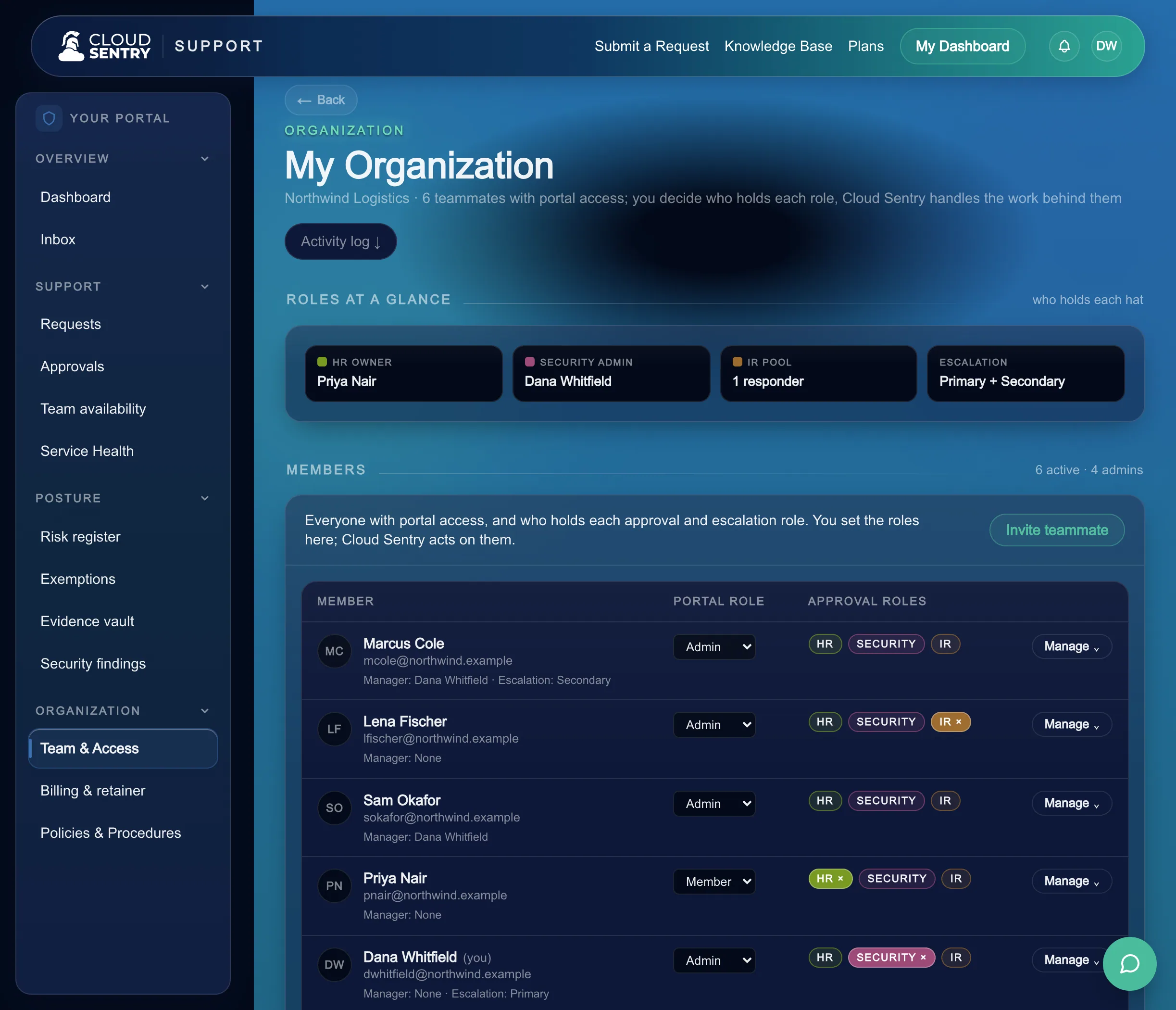
The person you name for joiners, movers, and leavers. Lifecycle requests for each person are gated on this role.
The Security Admin
A second set of eyes on the access that carries more weight, so a sensitive grant rests on two people.
One person, several roles
A small team can have one person hold more than one role. You choose who approves, and the steps stay the same for two people or ten.
What you see: the decision
Approve or deny from a link.
Approvers get a message with a secure link. They open it, read what is being asked and why, and decide from whatever device is in their hand.
A link scoped to one request
The link carries a token for that request, so an approver decides in the moment and the decision is recorded against the right request.
Several approvers see the same request
When a request needs more than one approver, everyone sees the same request, and you watch the decisions fill toward the yes it needs.
A single denial stops the request
If any required approver declines, the request ends there, and the person who asked gets a clear answer.
What you see: access reviews
Reviews arrive as a queue, and each line is a decision.
When a campaign opens, the accounts to review appear in the review queue, in the People area of the Portal. Our specialists run the campaign and follow up with reviewers as the due date nears.
Keep or revoke on each account
A reviewer decides keep or revoke for each line. Campaigns cover staff, guest and external accounts, a single vendor's accounts, and off-cycle reviews.
Revocations are carried out for you
Every revoke goes to our specialists, who remove the access and close the request. The outcome flows into your evidence.
Exceptions go to the risk register
An exception found in a review is routed to your risk register, so it is recorded and owned.
What you see: joiners, movers, leavers
Each person's lifecycle runs as one record.
Granting access to a new hire, changing it when someone moves, and removing it when someone leaves run per person in the Portal, gated on your HR Owner.
A new hire starts ready
The joiner is set up per person, and onboarding-required policies gate a joiner step.
- The HR Owner starts the joiner
- Onboarding-required policies gate a joiner step
- Our specialists create the accounts and verify them
A change keeps access current
When someone moves teams, the change runs as a request for that person, on the same approvers.
- The HR Owner starts the change
- Approvers decide on the new access
- Our specialists change the account scope to match
A departure closes out fully
On the last day our specialists run the leaver steps, and the person's approval roles are removed that day.
- The HR Owner starts the leaver
- Our specialists carry out the revocations
- The record shows each step closed
What you see: approver cover
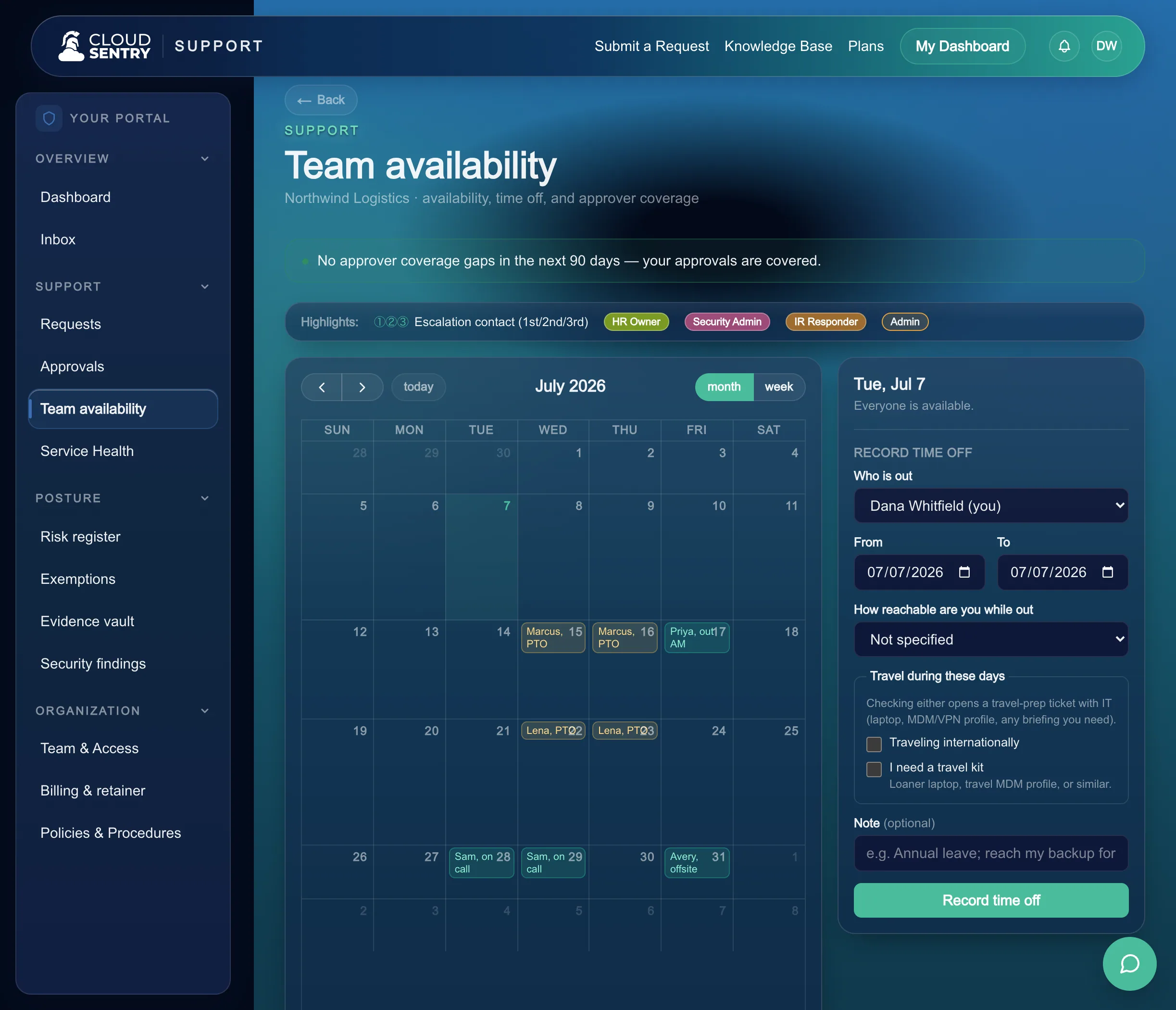
Approvers record time off, and cover shows up in advance.
Anyone who approves can record time off in the Portal's team availability view. The view flags gaps in approver coverage ahead of time, so you can arrange cover before a request is waiting.
What you sign
Approve or deny from a link. Keep or revoke in a review.
Two kinds of decision are yours. An approver opens a link and approves or denies a request. A reviewer opens a review campaign and decides keep or revoke on each account.
How joiners, movers, and leavers runWhat you keep
The decision record, and the outcomes behind it.
Each request keeps who decided and when. Executed revocations and review outcomes flow into your evidence, ready for the next question about who has access to what.
See how evidence is keptThe team inside
The people who run this with you.
Named specialists, reachable in the portal, answering you directly.

Juston Eubanks
Junior Cloud Operations Specialist

Jason Bowen
Cloud Operations Specialist

Ken Hanson
Founder & CEO

John May
Fractional CIO & Advisor

Emil Diaz
Fractional CTO
Easy is approving from a link and finding the access already in place, with the record kept.
This is how we keep security and compliance easy.
Next: PoliciesAccess that arrives on time and closes out clean.
Requests, approvals, reviews, and the lifecycle for each person run on one set of steps, with our specialists carrying out the work behind them.
Walk through how access requests reach your approvers and how our specialists carry them out, mapped to your team.
Access is one front door among many. See how the rest of your cloud, IT, and security run in the same place.