
The evidence is collected before anyone asks.
It starts when
Four moments start the work.
The evidence comes from activities already on the calendar, so each of these moments finds it collected and mapped to your controls.
An auditor opens an examination
We set the examination up in the Portal and track it from the first day: its observation window, its period completeness and every request.
A buyer asks for proof
A customer's security review arrives. We scope a share to the framework they asked about, and the evidence behind it is on hand.
A recurring activity comes due
The compliance calendar lists each recurring activity, such as a configuration review or an audit log review. A specialist runs it when it comes due, and an overdue one escalates.
An auditor sends a request mid-examination
Each auditor request lands in the examination's request tracker, and our CISO answers it from the frozen records.
What our specialists do
We make the evidence, then hand it over.
Five jobs run through the year, so an audit is the reading of a record that already exists.
Run the recurring activities
Configuration reviews, audit log reviews and network rule reviews sit on your compliance calendar. A specialist runs each one when it comes due.
Assemble and map the evidence
For each activity, a specialist assembles the evidence and maps it to the controls of your framework.
Our CISO reviews, then you sign off
Our CISO reviews each activity first. It then goes to you for sign-off, which freezes the record.
Run the examination with your auditor
Our CISO follows the observation window, the completeness of the period and every request an auditor sends.
Share scoped access
Your auditor or reviewer receives scoped, time-bound, watermarked access to the evidence.
The calendar runs on a set rhythm: Microsoft 365, AWS and endpoint configurations each quarter, audit logs monthly with reviewer sign-off, and network rules twice a year.
What you see in the Portal
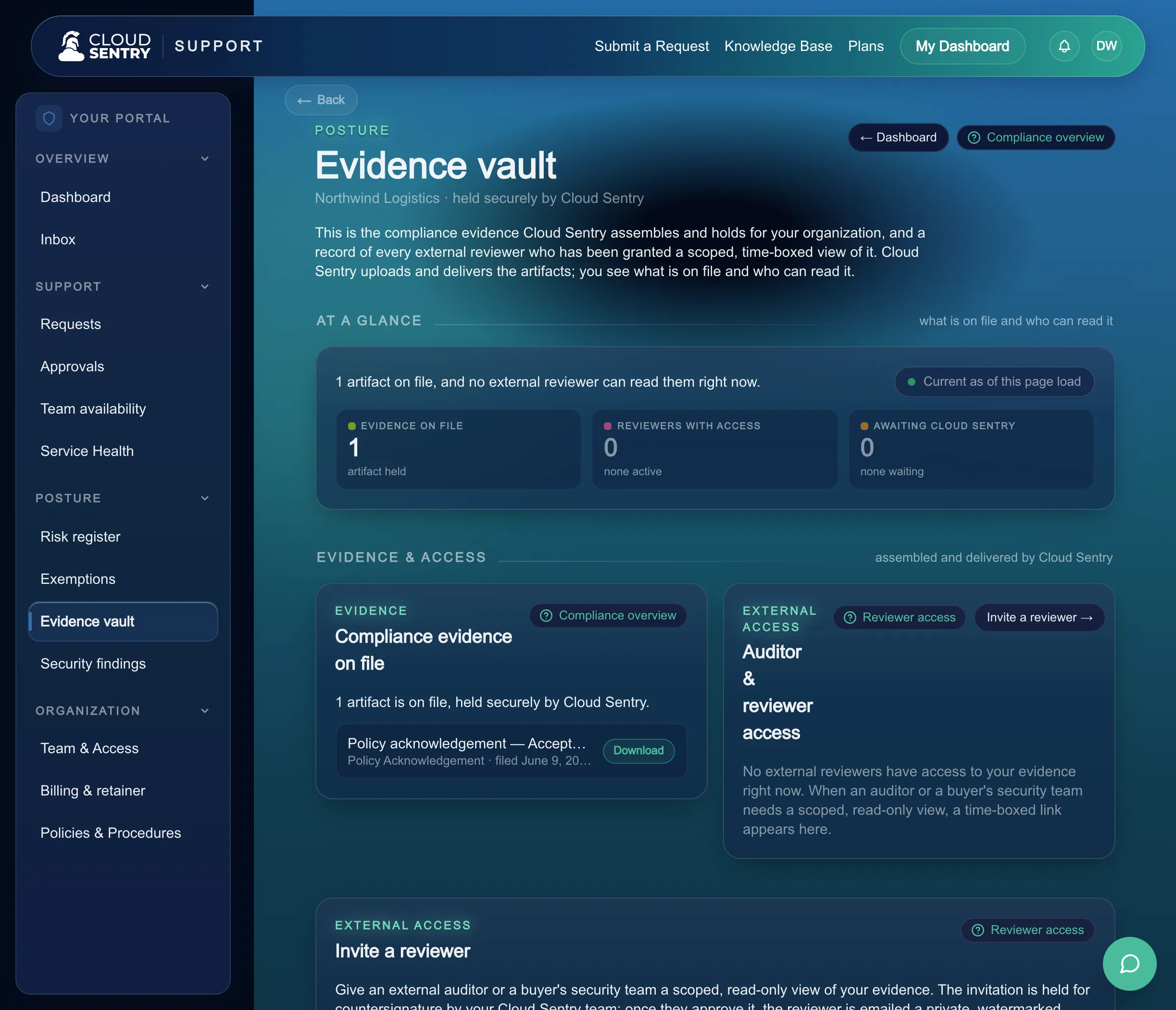
Your compliance home shows what an auditor will ask for.
The compliance home is the page where the record of the year lives. You see the examination coming, and you see the evidence behind each control.
What an auditor will ask for
The compliance home lists the items an auditor will ask for, so you see the shape of the examination before it opens.
Each control's evidence history
Open a control to see its evidence history, activity by activity, each entry a frozen record you signed off.
Examination tracking
Each examination shows its observation window, the completeness of the period and a tracker for every request the auditor sends.
How an auditor or buyer gets it
Sharing evidence takes three steps.
The evidence is already collected and mapped to your controls, so a share takes a moment: choose the scope, set the window, send the link.
- 01
Pick the framework scope
Choose what this reader gets to see, scoped to the framework they care about. An auditor reviewing your access controls opens the evidence for exactly that scope.
- 02
Set the window
Decide how long the link stays open, from a few days to a full review window. When the window ends, the link closes on its own.
- 03
Send the link
Share the link and you are done. The reviewer clicks and reads evidence our specialists already collected.
What your auditor or buyer sees
A clean, verifiable read, open for the window you set.
The person on the other side is busy and careful. They open a link and read, and the scope, the watermark and the expiry show a company that keeps its house in order.
Opens from the link
The reviewer clicks the link and lands in the evidence for the scope you chose. The link is the only thing their side needs.
Watermarked views
Every view carries a watermark tying it to the party you shared with, so the evidence stays traceable to the review it was opened for.
A clean expiry
When the window you set ends, the link closes. The reviewer read what they needed during the review, and the record stays safe in your Portal.
Illustrative. A reader's view of a scoped, watermarked share that carries its own expiry.
The audit trail
You can see who looked, and you decide who looks again.
A share is accounted for from the moment it opens. Every view lands in a log, and an extension request comes to you.
Illustrative. Each guest view writes a line to the log, and an extension request is yours to grant or decline.
Every guest view logged
Each time a share is opened, it is recorded: which share, and when. You hold a plain record of what was shared and with whom.
Extension requests come to you
When a reviewer wants the window held open longer, they ask, and the request arrives in your Portal for you to decide.
You decide
Grant the extension, or let the window close. A share stays open as long as you want it open.
What you sign
You sign off each activity, and you grant access.
When our CISO finishes an activity's review, it comes to you for sign-off, and your sign-off freezes the record. When an auditor or reviewer needs to read it, you grant time-bound access.
How auditors read the evidenceWhat you keep
The frozen record, and the log of who viewed what.
Every activity keeps its frozen record, mapped to your controls, in the Portal. The log shows who viewed what, and when.
Easy is sending an auditor a time-bound link to evidence our specialists already collected.
This is how we keep security and compliance easy.
Next: Security operationsAn audit that starts ready.
Evidence collected on the calendar, signed off by you, and read by your auditor or buyer from a time-bound link. That is how we deliver audits, on the platform that runs your cloud, IT, and security.
Find the level of coverage that fits your company, from a single hour of help to your entire stack run for you.
Talk through your next audit or buyer review with us and see the evidence, and the rest of the platform, on a real walkthrough.